Create invoices quickly
Select a customer, add invoice rows, VAT, due date and reference details. Create professional invoices without complicated templates.
JobClock is Finnish invoicing software for small and medium-sized businesses. Create invoices, send e-invoices, email invoices and PDF invoices, and get clear accounting reports in one system.
No credit card required · No commitment · Works on desktop and mobile
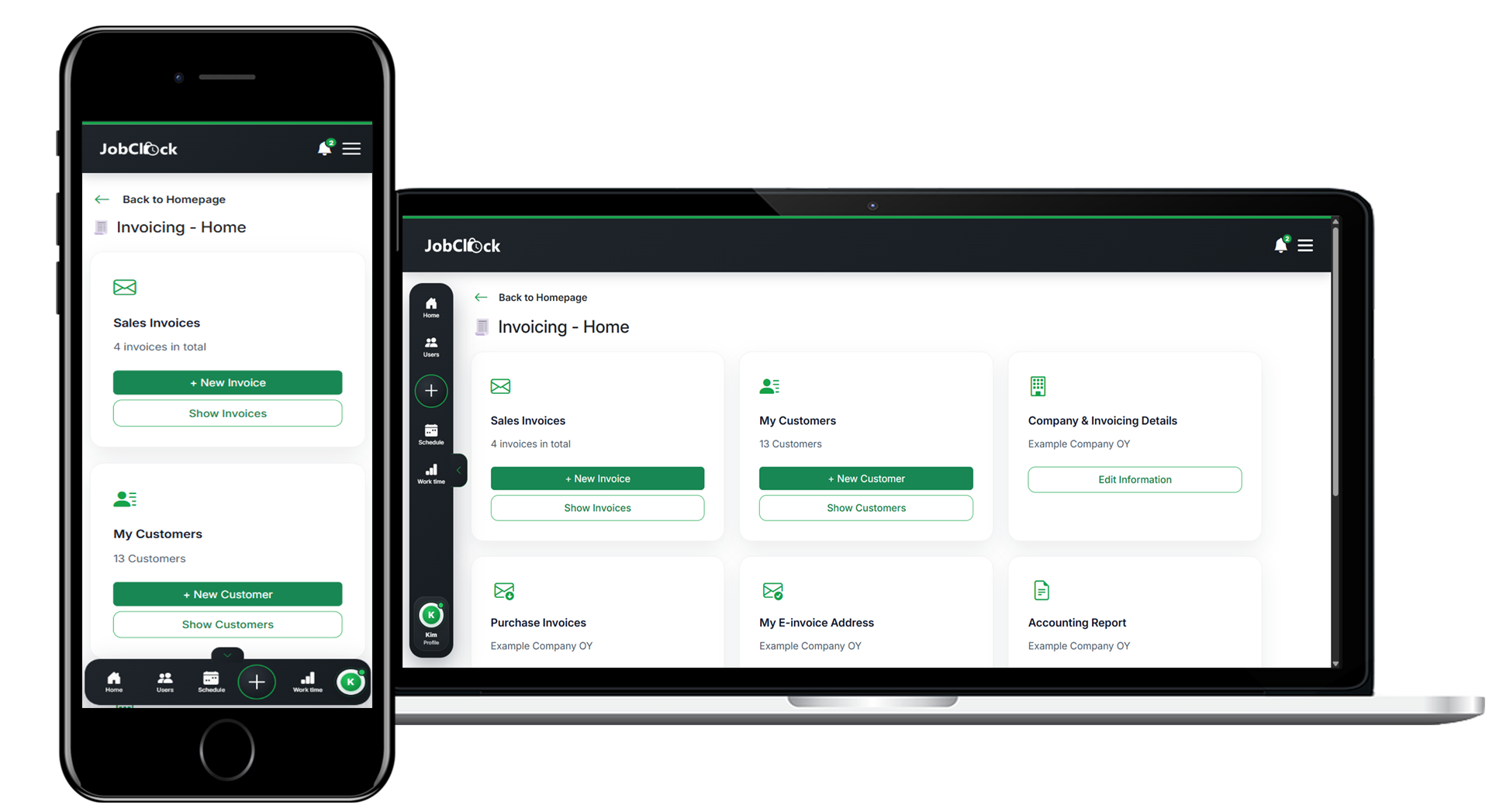
Are you looking for invoicing software in Finland that makes it easy to create invoices, send e-invoices, manage customer details and prepare material for accounting? JobClock helps businesses bring invoicing, customers, projects, work hours and reporting together in a modern system that works on both desktop and mobile.
Many businesses still create invoices manually, search for the right customer details, save PDF files in multiple places and send material separately to the accountant. It takes time and increases the risk of errors.
Create the invoice, choose the delivery method and follow up the work in one system. JobClock is especially useful for businesses that want to connect invoicing with customers, projects, work hours and reports.
JobClock brings the most important functions for modern invoicing into one easy-to-use system. You do not need to combine several tools to create, send and follow up invoices.
Select a customer, add invoice rows, VAT, due date and reference details. Create professional invoices without complicated templates.
Send invoices by email, as an e-invoice, as a PDF or through print service. You choose the delivery method that suits the customer best.
Save customer details, billing addresses, email addresses and e-invoice addresses. The next invoice is faster to create.
Follow up unpaid invoices and send reminders when an invoice is not paid on time. Better follow-up helps your cash flow.
Export accounting reports or invite your accountant directly to JobClock at no additional cost. Your accountant gets access to invoices, receipts, documents, and reports directly within the system.
Connect invoicing to projects, work hours, materials and reports. Perfect for construction, service, installation and contracting.
Many companies want to receive invoices digitally. With JobClock, you can send e-invoices directly from the system while keeping the same simple workflow for customer database, invoice rows and reporting.
Send digital invoices to companies that receive e-invoices.
Send the invoice directly to the customer’s email address as a simple alternative.
When the customer needs a traditional invoice, you can use print service.
From customer to sent invoice in a few steps.
In the video, you can see how to add a customer, create an invoice, choose a delivery method and send the invoice directly from JobClock. (In Finnish)
Try invoicing for freeJobClock helps you collect invoice data and reports in a structured way. This makes monthly routines easier for both the business and the accountant.
Invite your accountant at no additional cost. When you create or receive invoices, the information is automatically updated in JobClock. Your accountant gets direct access to invoices, receipts, documents, and reports without the need for exports, emails, or manual compilation of accounting materials.
Invoicing software should not only create a good-looking invoice. It should also help you keep customer details, references, invoice status, reports and supporting material organized.
JobClock suits businesses that want a practical invoicing system, while also being able to connect invoicing with projects, work hours, materials, mileage and other parts of the business.
Read more for accountantsJobClock is especially suitable for businesses that invoice work, projects, services, materials or recurring customer jobs.
Invoice projects, work hours, materials and contracting work.
Create invoices for service jobs, installations and customer visits.
Invoice machine work, hours, mileage, volumes and projects.
Simple invoicing software for services, hours and customer assignments.
If your business still creates invoices in Excel, Word or separate PDF templates, JobClock can make invoicing faster and more structured. You get customer database, invoice rows, delivery methods, follow-up and reports in one place.
This makes JobClock a practical choice for businesses that want to move from manual invoicing to digital invoicing software without introducing a heavy accounting system.
JobClock works in the browser and as a mobile app. Manage customers, invoicing and follow-up wherever you are.
Pricing is based on the number of users. All invoicing, project, reporting and time tracking features are included in the price.
€7,90 /user/month
14-day free trial
All features included€6,50 /user/month
14-day free trial
All features includedContact us
For larger organizations or specific needs, we offer tailored solutions and agreements.
Try for free · No credit card required · No commitment
Here are answers to common questions from businesses looking for simple invoicing software.
Yes. JobClock can be used as invoicing software to create, send and follow up invoices. You can send invoices by email, e-invoice, PDF and print service.
JobClock uses simple user-based pricing. One user equals one employee or person who is added to JobClock and uses the system.
For companies with 1–4 users, the price is €7.90 per user per month. For companies with 5 or more users, the price is €6.50 per user per month.
All features are included in the subscription, including invoicing, e-invoicing, customer management, projects, time tracking and reporting. You can also try JobClock free for 14 days without a credit card and with no long-term commitment.
Yes. JobClock supports e-invoicing for businesses that want to send invoices digitally to customers that receive e-invoices.
Yes. You can send the invoice directly from JobClock to the customer’s email address or download it as a PDF.
Yes. You can create and download invoices as PDF. This is useful when the customer wants to receive the invoice by email or when you need to save an invoice copy.
Yes. JobClock is especially suitable for small and medium-sized businesses that want a simple system for invoicing, customers, projects, work hours and reporting.
Yes. JobClock helps you keep invoicing data and reports organized in one place, making monthly routines and collaboration with your accountant easier. You can also invite your accountant to JobClock at no additional cost, giving them direct access to invoices, receipts, documents and reports within the system.
When you create an invoice or receive an e-invoice, the information is automatically updated in JobClock. This means your accountant can access the required records immediately, without exporting files, sending emails or manually compiling accounting material every month.
Yes. JobClock suits businesses that invoice work, projects, hours, materials, service jobs and installations. That makes the system a good fit for construction, service, contracting and other project-based businesses.
Yes. JobClock works on desktop, tablet and mobile. The app is available for Android and iOS.
Create an account and try JobClock for free. Get started with invoicing, customers, e-invoices and reports without a credit card.
Contact us if you have questions about invoicing, e-invoices, accounting reports or how JobClock fits your business.
Start a conversation